FREE TO START · NO DOWNLOAD · NO ACCOUNT NEEDED
Learn light by moving it.
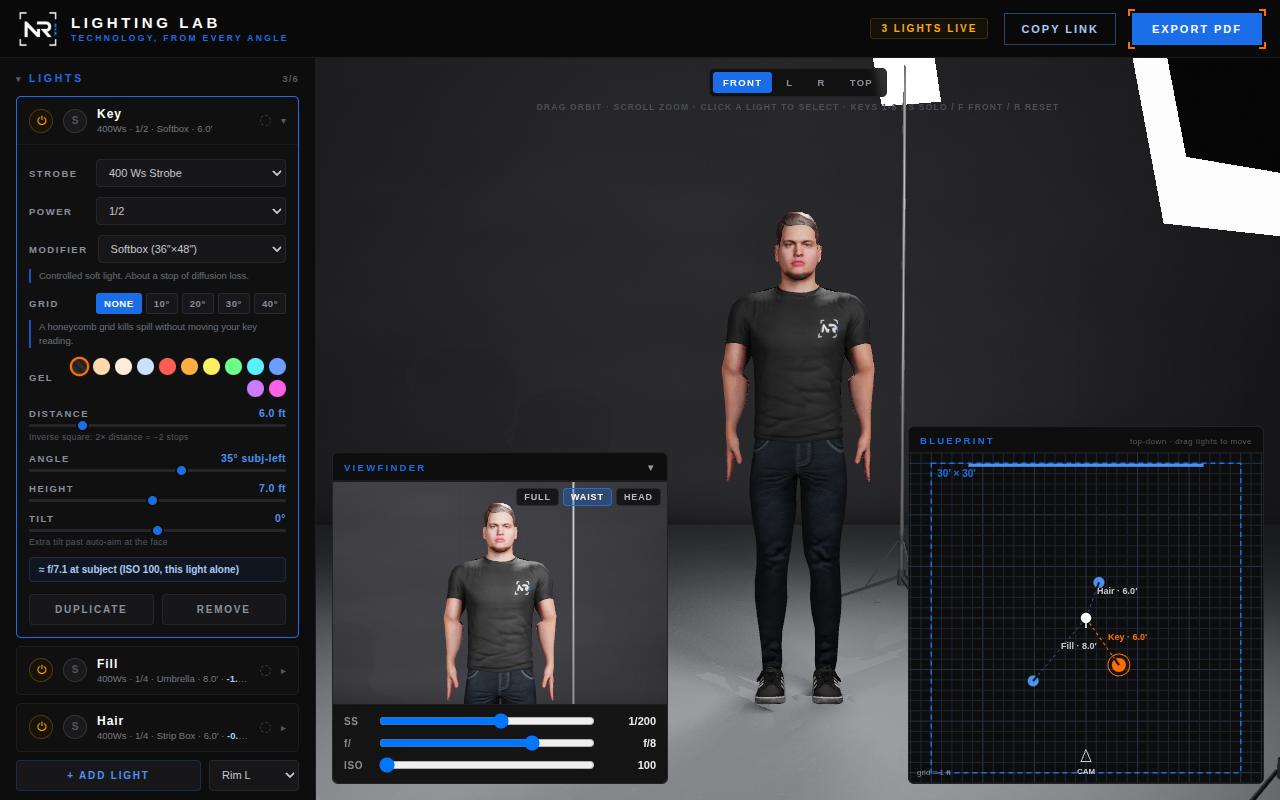
Lighting Lab is an off-camera flash simulator that runs in a browser tab. Put real strobes and modifiers around a subject, drag one two feet back, and watch the exposure, the falloff and the shadow edge change the way physics says they must — without burning a studio day to find out.
Nothing to install, nothing to sign up for, and no discrete graphics card required. It runs on a Chromebook. The free lab is the whole engine with three lights; Pro adds the rest of the gear.
Why it exists
The inverse square law is easy to say and hard to feel.
E = I / d² ILLUMINANCE, PER FRAGMENT, DISTANCE IN FEET
You can be told that doubling the distance costs two stops. You learn it when you drag a key from 6 ft to 12 ft and watch the face go dark by exactly that much while the shadow edge hardens, because the source just got smaller relative to where it stands. That is the whole product: a room where you can be wrong for free.
Nothing on screen is painted or hand-tuned to look plausible. Every brightness comes out of that equation and the modifier's own beam geometry, computed per pixel:
- Real inverse square, unclamped. Doubling the distance measures −2.00 stops on rendered pixels from 4 ft to 16 ft.
- Real watt-seconds. 400 Ws renders exactly twice the illuminance of 200 Ws; 1/2 power is exactly one stop down.
- Real modifiers. Flux is spread over the beam's cone, so a deep focus reflector genuinely out-punches an umbrella at equal watt-seconds, and a stop of diffusion loss lands where it should.
- Real grid behaviour. A honeycomb's transmission curve is derived from the overlap of two circles offset by the cell depth — the same vignetting integral as looking down any tube. A grid kills spill; it does not brighten your key.
- Real penumbra. Shadow softness scales with source size and with the gap between subject and background, so a big box close in wraps and a bare bulb cuts.
- An anchored scale. The whole exposure scale is pinned to one real-world reading — 400 Ws through a 45″ shoot-through umbrella at 6 ft, full power, is about f/11 at ISO 100 — and everything else follows by inverse square.
What you can ask it
Questions you actually have on set.
Not abstractions. The three that come up in every shoot, answered in seconds instead of in test frames.
01
Where does the key go?
Build the look, then move the light and watch what it does to the shadow on the far cheek. Loop, Rembrandt, split and butterfly come out of where the light is standing, not out of a preset name.
02
What happens to my f-stop?
Each light card reads out the aperture that light alone meters at the subject and its ratio in stops against the key. Back it off two feet and read the new number.
03
Why is the far end of the group dark?
Stand up to five people on an arc and the panel measures the real distances and tells you how many stops the row spans — then tests the fixes rather than asserting them. Backing the key off always helps; curving the row helps an on-axis key and hurts a 45° one, and it reports both.
It runs on what you already have
A browser tab. That is the entire system requirement.
There is no installer, no plugin, no extension, no app store, no account and no paywall. Open the page and it is running. This matters most on exactly the hardware that usually rules simulation software out — a school Chromebook, a shared lab machine, a laptop with no graphics card in it.
NO DISCRETE GPU NEEDED
The renderer is hand-written WebGL 2 with no engine underneath it, and it draws on integrated graphics. Shadow maps and reflections re-render only when something actually changes, so a still frame costs almost nothing.
IT ADAPTS TO SLOW HARDWARE
The app watches its own frame time and quietly drops internal render resolution when frames get heavy, then gives it back when they do not — down to 67% and no further, with the contact-shadow pass stepping down alongside it. You keep an interactive scene instead of a slideshow. There is a manual Auto/High switch if you would rather decide yourself.
YOUR SETUPS NEVER LEAVE THE BROWSER
No account, no sign-in, no analytics, no tracking, no cookies and no local storage.
Every rig you build lives in the page and nowhere else, and a shared setup rides
entirely in the URL fragment after the #, which browsers never transmit
to a server. Nothing you make here is uploaded, stored or logged by this site.
Two things do reach the network, and it is worth being exact about them. The outdoor Shoot Planner is optional and silent until you open it: typing a place name sends that text to Open-Meteo's free public geocoding service, and pressing CHECK CONDITIONS sends the latitude and longitude you picked, the date and the time zone to Open-Meteo's free public forecast service. No API key, no account, nothing about your rig — and, as with any web request, the service sees the IP address it came from. Leave the planner closed and the lab makes no request of it at all; the sun's position is NOAA math computed on your own machine, which is why the planner still works offline and for any date. Separately, every page here loads the Montserrat typeface from Google Fonts, so Google's font servers see a request from your browser on each visit. That is the complete list.
AND IF THE BROWSER CAN'T
The renderer needs WebGL 2 with floating-point buffers. A browser without them gets a plain-English panel saying so and what to try, with the dead controls disabled rather than left looking live — not a black rectangle. Current Chrome, Edge, Firefox and Safari all qualify with hardware acceleration on.
Everything above is what the app does on its own. The only outbound traffic is the Montserrat webfont on every page and, if you open it, the Shoot Planner's location and forecast lookup — both spelled out in full above.
What's in it
A studio you can rebuild in under a minute.
A tour rather than an inventory — there is more in the app than this.
Six lights, real gear
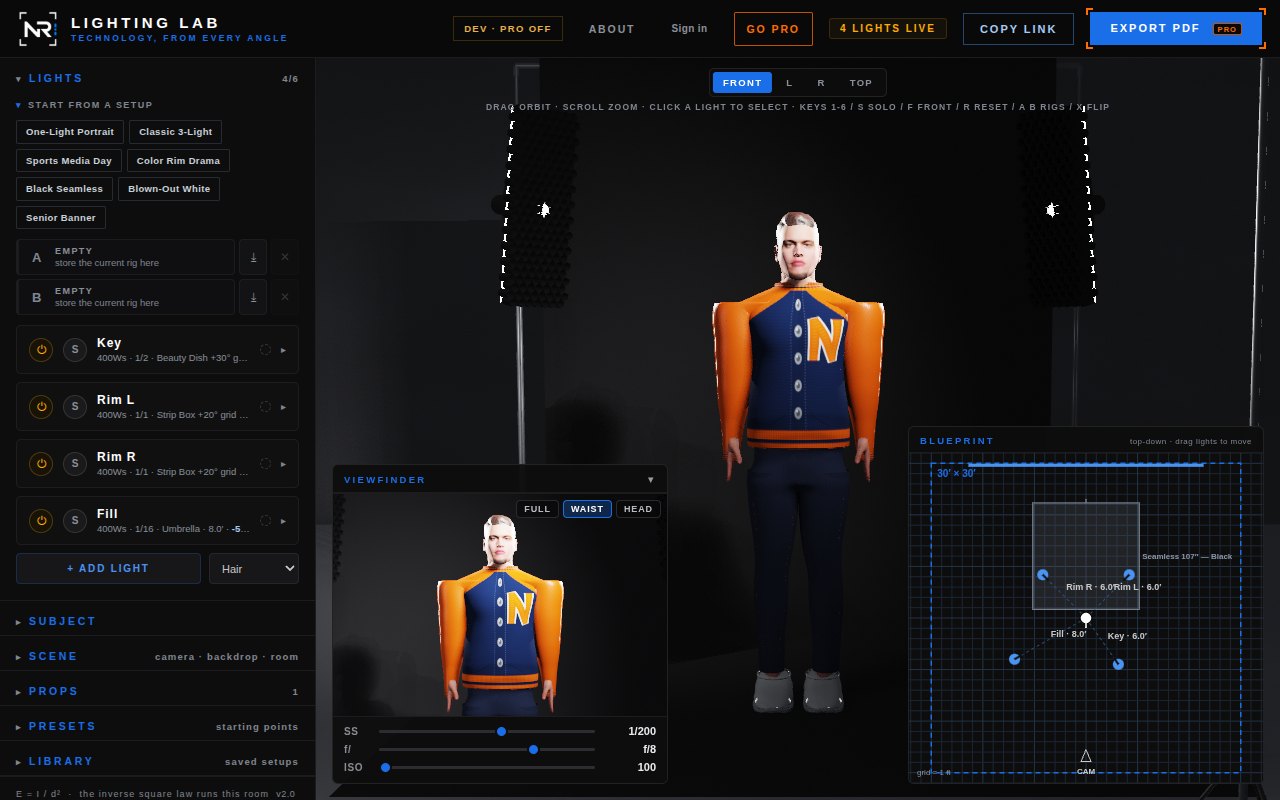
Key, fill, hair and rims. 200/400/600 Ws strobes from full power down to 1/128; bare reflector, 45″ umbrella, 36×48″ softbox, 12×36″ strip, deep focus reflector and 22″ beauty dish; honeycomb grids at 10°, 20°, 30° and 40°; CTO, ½ CTO, CTB and eight party gels that colour the reflections too. Every light auto-aims at the face, and any light can be unlinked and panned: point one at the seamless to blow it white, or skim a rim past a shoulder instead of into a cheek.
Indoors and outdoors
Eleven studio backdrops and seven skies, seven floors from black gloss to a basketball court to grass, and a room you can size from 8 to 40 ft. Volumetric haze that makes beams visible, raymarched through the same falloff the surfaces use.
A sun you can put anywhere
Azimuth, elevation, brightness and hard or soft shadows, warming automatically at low angles. The Shoot Planner takes a real location, date, time and camera direction and computes the sun's exact position with the NOAA algorithm.
Props and seamless rolls
Chair, stool, podium, side table and apple box, plus full seamless rigs — 53″ white, 107″ in white, thunder gray, black, chroma green and bone, and a 9 ft muslin — with sweep, crossbar, stands and clamps. They light and shadow like anything else.
Up to five subjects
A row on a shallow arc with spacing, curve and inward turn. Nobody's brightness is normalised: every person stands at their true position and takes whatever E = I/d² gives them, which is the lesson.
Two photoreal figures, plus a built-in
A male and a female avatar ship with the app and can be mixed person by person across
a row, alongside a procedural figure with hair and skin options. Or load your own
.glb. Turn the subject to any angle for a three-quarter pose; caps,
graduation caps and glasses fit to the head as measured and turn with it.
Sixteen uniforms, cut to the body
Baseball, football, basketball, soccer, softball, track, volleyball (men's and women's), hockey, wrestling, cheer, marching band, graduation gown, letterman jacket, tennis and golf, each in ten colourways and each cut to whoever is standing there. A matte jersey eats light, white pants bounce fill up under the chin, a hockey helmet and a sequined cheer panel throw hard speculars, and a black graduation gown is a broad shiny nothing until a hair light finds its edge. The kit is part of the lighting problem.
Your team's logo
Upload a PNG, JPG or SVG and it goes where the crest goes on every kit: the chest, the ball cap, the helmet sides, the shako plate, the race bib, the letterman's chenille letter. Never stretched, sized to the cloth of the body wearing it, and it stays in your browser.
Viewfinder with real exposure
A camera panel with Full / Waist / Head crops and live shutter, aperture and ISO. The off-camera-flash split is faithful: aperture and ISO scale everything, shutter scales only ambient. Drag the shutter outdoors and the sky blooms while the flash holds.
Top-down blueprint
A plan view on a 1 ft grid with real distances, the camera, the sun direction and draggable lights and props — the diagram you would otherwise sketch on the back of a call sheet.
Shareable links
COPY LINK packs the entire setup — lights, grids, subject, group, uniform, room, sun, props, camera angle — into a URL. A six-light scene lands around 300 characters of readable text, and it never touches a server.
PDF setup sheets
One click writes a sheet with a viewport snapshot, the top-down diagram, a full per-light settings table and auto-generated inverse-square notes — what the key meters, and where to move it for a stop either way.
Free and Pro
The free lab is the whole engine. Pro is the rest of the gear.
Nothing in the physics is held back. What Pro adds is equipment, wardrobe and output. A shared link always opens in full, whoever made it and whoever opens it; the free lab simply will not let you push a setup further into Pro territory.
Free
Three lights. Bare reflector and 36×48″ softbox. Red and blue gels. Gray, white and
black studio walls, the clear-day sky and the three studio floors. The One-Light
Portrait and Classic 3-Light presets. Both photoreal figures, the built-in figure and
your own .glb. Caps, grad caps and glasses. The viewfinder, the blueprint,
the sun, and shareable links.
Pro
Six lights. Every modifier, every gel and the honeycomb grids. Lights you can unlink and pan off the subject. All eleven backdrops, seven skies and seven floors. Sixteen uniforms with your team logo. Rows of up to five. The Shoot Planner. PDF setup sheets, the five-view PNG sheet, and a cloud library of saved setups. Monthly, annual or a one-time founding lifetime licence, from the GO PRO button in the lab.
For schools and programs
Built to survive a managed device and a 50-minute period.
Most lighting software fails a photography classroom before the lesson starts: it needs an install, an admin, a licence server, a GPU, or a student account with an email address nobody wants to hand over. This needs a URL.
- Nothing to install on managed devices. No admin approval, no image update, no per-machine licence. It is a web page.
- It runs on the hardware labs actually have. Chromebooks and integrated-graphics lab machines, with the render scale adapting on the slower ones so the class does not sit watching a stutter.
- No student accounts and no data collection. Nothing to sign up for, no cookies, no local storage, no analytics, no tracking. A student's work never leaves their browser. The site itself calls out to exactly two places, and never with anything a student made: Google Fonts for the typeface on every page, and — only if a student opens the optional outdoor Shoot Planner — Open-Meteo's free geocoding and forecast service, which receives the place name they typed and the coordinates, date and time zone they picked. The full wording is here, and it is the same list a network filter will show you.
- One link starts the whole class in the same place. Build the rig once, copy the link, paste it into your LMS, and every student opens on the identical setup — a lit three-point portrait to modify, or a deliberately broken one to fix.
- They have something to hand in. EXPORT PDF gives each student a setup sheet with the diagram, the full light table and the inverse-square notes — a gradeable artefact that shows their reasoning, not just their result.
- It teaches the thing that transfers. Students who have moved a light and watched two stops disappear arrive in the real studio already knowing why.
Classroom licensing
Lighting Lab is free to use, and it stays that way for individual photographers and students. Schools that want to build it into a course usually want more than a public link, and that is worth a conversation rather than a checkout page.
A classroom licence is where things like these get sorted out:
- Multi-seat classroom use — a clear, written arrangement covering a whole cohort or department rather than an individual.
- Curriculum and assignment support — starting rigs built to your syllabus, exercises with a defined right answer, and setup sheets that match what you already grade.
- A school-branded deployment — where it makes sense, a copy carrying your program's identity, or one hosted where your students already log in.
Tell me what you teach and how, and I will tell you honestly whether this fits it. There is no price list here on purpose: a two-section high school elective and a university program are not the same conversation.
or write to nrohr@nathanielrohr.com
The button opens your mail client with a short template already in it — school, course, rough student numbers, term dates and what you are hoping to do. Answer as much or as little of it as you like.
Known limitations
What it cannot do.
This project would rather say what it cannot do than be quietly wrong. These are the real gaps, stated plainly.
No wall bounce
Backdrops and floors receive light and shadow, but they do not throw any back. A white wall two feet camera-left changes nothing here, and it changes plenty on set.
No viewfinder preview on a phone
The viewfinder is a floating instrument panel, and at 390 px wide it would cover a third of the only view of the subject — so on a phone it is hidden, and with it the framed FULL / WAIST / HEAD preview of what the camera sees. The exposure itself is not lost: shutter, aperture and ISO are three rows at the top of the SCENE panel on any phone, in either orientation, and they drive the same physics and travel in the same shared links as the dials do. What a phone cannot show you is the crop.
A group shares one uniform
Kit and colourway are single values, so everyone in a row wears the same thing. Bodies can be mixed male and female person by person, and the jersey number rides on the body — but kits and colours cannot vary within a row.
Ambient occlusion attenuates ambient only
Baked occlusion and the screen-space contact pass can only remove ambient light, never a strobe's contribution — the renderer enforces that structurally. It is a physical statement rather than a safety rail, but the bound is real: contact darkening does almost nothing on brightly lit floor beside a foot, and it is no kind of global illumination.
Exposure, not optics
The viewfinder simulates the exposure triangle faithfully. It does not simulate depth of field — aperture changes brightness here, not what is sharp.
Go move a light.
It opens in a tab, the free lab costs nothing, and you cannot break anything.